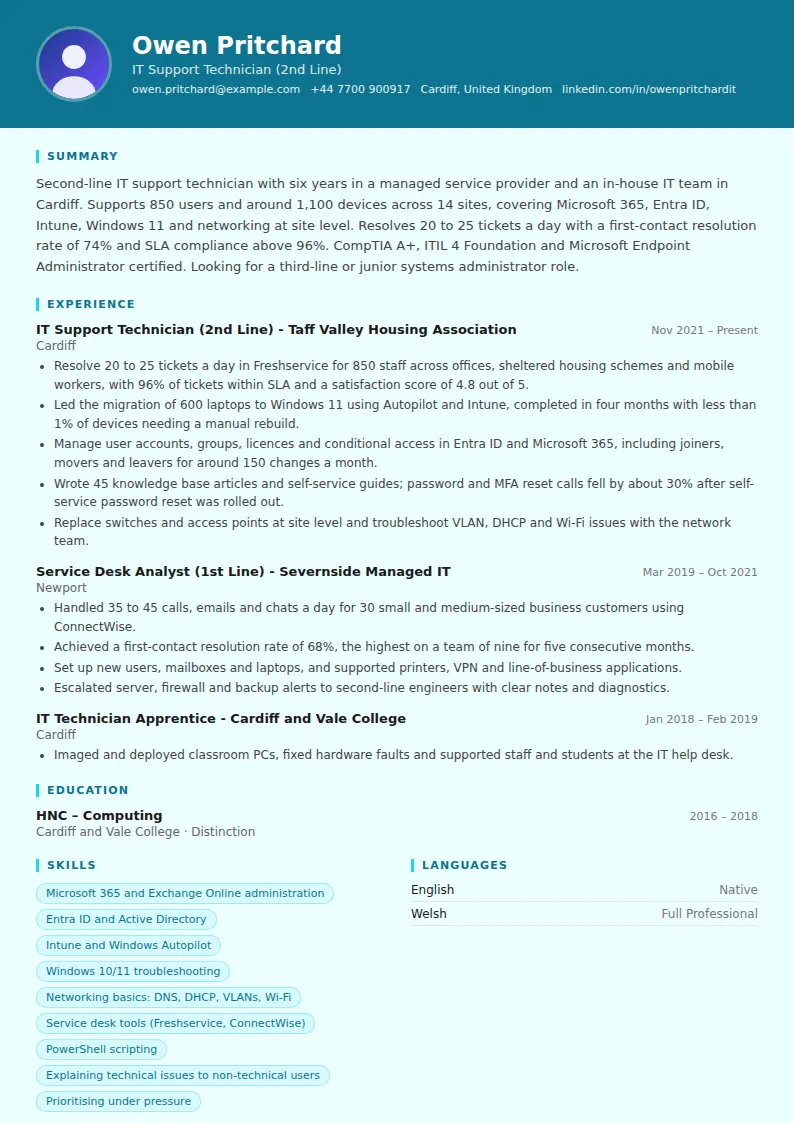
How to write an IT support CV summary
Your summary should place you on the support ladder and show the environment you know. In three or four sentences, include:
- Support level: first line, second line, desktop, field or third line.
- Environment: number of users, devices and sites; in-house or managed service provider; sector, such as schools, healthcare or finance.
- Core technologies: Microsoft 365, Entra ID or Active Directory, Intune, Windows, macOS, networking, specific applications.
- Performance and certifications: tickets per day, first-contact resolution, SLA, and your main certificates.
End with your next step, such as second line, systems administration, networking or cloud. Avoid opening with IT enthusiast or passionate about technology; the details above say more.
Experience: tickets, SLAs and projects
Service desks measure their work closely, so you likely have good numbers available. Use them in your bullets:
- Volume: tickets, calls or chats per day; users and devices supported.
- Quality: first-contact resolution, SLA compliance, customer satisfaction scores, reopened tickets.
- Projects: device rollouts, operating system upgrades, migrations to Microsoft 365 or Intune, office moves, new site set-ups.
- Improvements: knowledge base articles, scripts, self-service tools or automation that reduced tickets.
- Escalation and teamwork: how you diagnose before escalating, and how you work with third line, networking or vendors.
Projects are what separate a second-line CV from a first-line one, so give each one a bullet with its size, timescale and result.
Technical skills and tools to list
Group your technical skills so a hiring manager can scan them quickly:
- Identity and productivity: Microsoft 365, Exchange Online, Teams, SharePoint, Entra ID, Active Directory, Google Workspace.
- Devices: Windows 10 and 11, macOS, iOS and Android, Intune, Autopilot, SCCM, Jamf.
- Networking: TCP/IP, DNS, DHCP, VLANs, VPN, Wi-Fi, and switch and firewall brands you have worked with.
- Servers and scripting: Windows Server, Group Policy, PowerShell, basic virtualisation.
- Service management: ServiceNow, Jira Service Management, Freshservice, ConnectWise, remote support tools.
Be honest about levels. Interviews for IT support often include practical questions or a short troubleshooting exercise.
Certifications that help
Certifications are a common filter for IT support jobs, especially early in your career. Useful ones include CompTIA A+ for hardware and operating systems, CompTIA Network+ or Cisco CCNA for networking, Microsoft certifications such as Microsoft 365 Fundamentals or Endpoint Administrator, and ITIL 4 Foundation for service management.
List each with the issuer and year. If you are studying for one, add it with the expected date, such as Microsoft Azure Administrator, exam booked for March. Pair certifications with real examples in your experience, because employers value proof that you have used the skills.
Length, soft skills and getting started
One page suits first-line and entry-level candidates; two pages suit experienced second- and third-line technicians with projects to describe. Keep the layout simple and use the exact names of technologies, because many applicant tracking systems search for them.
Soft skills matter in support roles. Show them through examples: calming a frustrated user before a deadline, writing clear guides, or explaining a change to non-technical staff. If you are new to IT, a home lab, volunteer support for a club or charity, or helping in a school IT office can all be listed as experience, with what you set up and fixed.
IT Support Technician CV summary examples
Experienced
Third-line support engineer with ten years in IT support and infrastructure, currently the escalation point for a 2,500-user organisation across 30 sites. Manages Intune, Entra ID, Windows Server and Cisco Meraki networks, and led the move from on-premises Exchange to Microsoft 365. Mentors a team of six first- and second-line technicians. Looking for a systems administrator or infrastructure engineer role.
Mid-level
Desktop support technician with four years supporting 1,200 staff and students at a further education college, including classroom AV, device imaging and printing. Resolves 25 tickets a day with 95% SLA compliance. CompTIA A+ and Network+ certified. Looking for a second-line role with more networking and Microsoft 365 work.
Entry-level
IT graduate with a home lab running Windows Server, Active Directory and a small virtual network, and six months of volunteer IT support for a local charity. CompTIA A+ certified and studying for Microsoft 365 Fundamentals. Looking for a first-line service desk role.
IT Support Technician CV bullet point examples
- Resolved an average of 22 tickets a day with 95% within SLA and a customer satisfaction score of 4.7 out of 5.
- Raised first-contact resolution from 61% to 73% by writing troubleshooting scripts and knowledge base articles for the most common issues.
- Deployed 400 laptops with Autopilot and Intune for a new hybrid working model, completed two weeks ahead of schedule.
- Automated new starter account creation with PowerShell, cutting set-up time from 45 minutes to under 10.
- Rolled out self-service password reset to 900 users, reducing password-related tickets by 35%.
- Set up network, Wi-Fi and printing for two new branch offices, with both sites live on opening day.
- Supported 30 small business customers at a managed service provider, handling up to 40 calls and emails a day.
- Migrated 250 mailboxes from on-premises Exchange to Exchange Online over three weekends with no lost email.
- Trained and mentored three new first-line analysts during their first month on the service desk.
Skills for your IT Support Technician CV
Hard skills
- Microsoft 365 administration
- Entra ID and Active Directory
- Intune, Autopilot or SCCM
- Windows 10/11 and macOS support
- Hardware diagnosis and repair
- Networking: DNS, DHCP, VLANs, VPN
- Windows Server and Group Policy
- PowerShell scripting
- Service desk tools such as ServiceNow or Freshservice
- Remote support tools
- Backup and endpoint security basics
- ITIL incident and request management
Soft skills
- Clear explanations for non-technical users
- Patience with frustrated users
- Logical troubleshooting
- Prioritising competing tickets
- Clear ticket notes and documentation
- Teamwork with other IT teams
- Willingness to keep learning