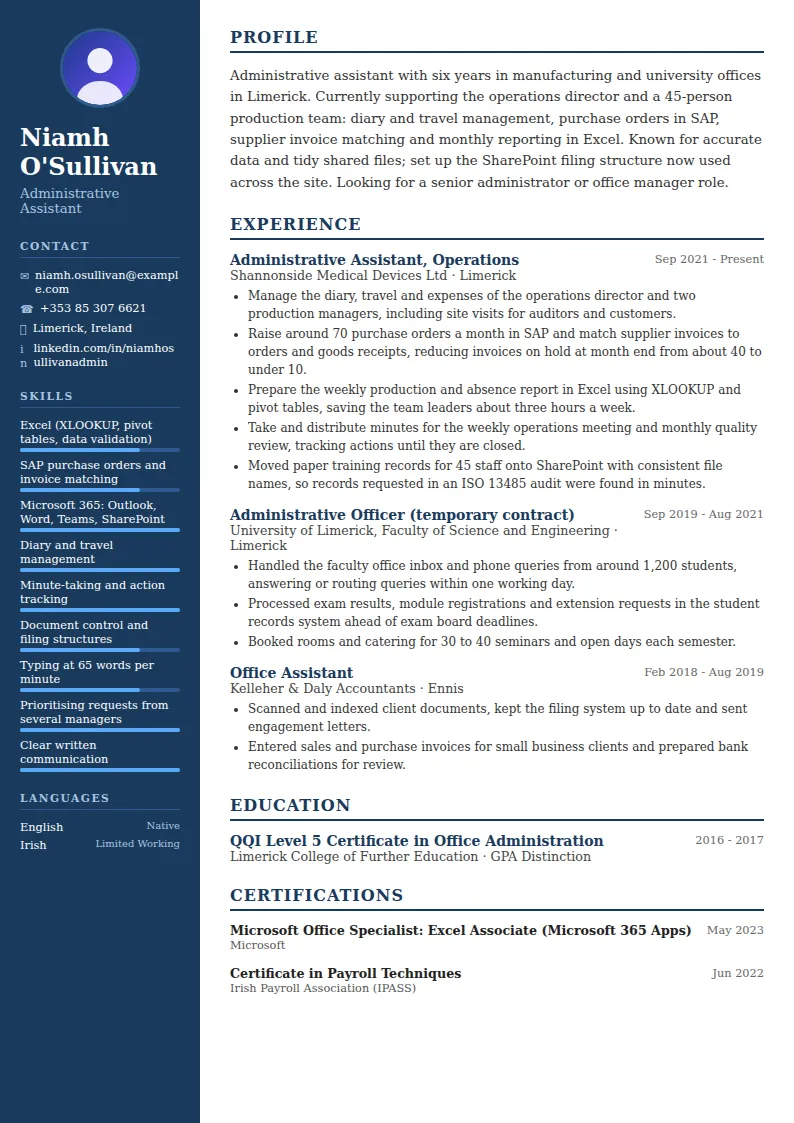
How to write an administrative assistant CV summary
Your summary should show the kind of office you support and the work you can take on without close supervision. In three or four lines, mention:
- The setting: sector and team size, such as a 45-person production site, a law firm, a school office or a property management company.
- Who you support: one director, a team of managers or a whole department.
- Core tasks: diary management, purchase orders, invoices, data entry, reporting, HR administration, customer orders.
- Systems: Excel level, finance or ERP systems such as SAP or Sage, CRM or practice management software.
Phrases like highly organised self-starter are expected from every administrator. Replace them with one result, such as reducing invoice backlog or setting up a filing system everyone now uses.
Putting numbers on administrative work
Admin tasks can be counted more often than people think, and numbers turn a list of duties into evidence. Look for:
- Volume: invoices processed per month, purchase orders raised, diaries managed, calls and emails handled, events booked.
- Speed: response times, turnaround on orders or reports, deadlines met.
- Accuracy: fewer invoices on hold, fewer errors in reports, clean audit results.
- Time saved: templates, spreadsheets or processes you created and how many hours they saved others.
Then write bullets as action plus task plus result: Built an Excel tracker for supplier deliveries, cutting chase-up calls by half. If you don't have exact figures, use honest estimates such as around or about.
Software and IT skills: be specific
Software is often the deciding factor between two admin candidates. Instead of good IT skills, name each system and show what you do with it:
- Excel: say what level you work at, for example lookups, pivot tables, conditional formatting or simple macros. Many employers test Excel at interview, so be accurate.
- Microsoft 365 or Google Workspace: Outlook calendars, shared mailboxes, Teams, SharePoint or Google Drive.
- Finance and ERP systems: SAP, Sage, Xero or similar, and whether you raise orders, process invoices or run reports.
- Sector systems: CRM tools, HR systems, student records, property or practice management software.
Certificates such as a Microsoft Office Specialist qualification or ICDL are useful proof, especially early in your career.
Education and qualifications
Administrative roles rarely require a degree, but a relevant qualification helps. List office administration courses, business diplomas, bookkeeping or payroll certificates and secretarial courses with the institution and year. In Ireland that might be a QQI Level 5 or 6 award in office administration; in the UK, a business administration apprenticeship or Level 3 diploma.
If you have a degree in an unrelated subject, list it simply and let your experience do the work. Short courses in GDPR awareness, minute-taking or a specific system are worth one line each if the job advert mentions them.
Tailoring to the job and keeping the CV tidy
Admin job adverts often list tasks in detail, which makes tailoring straightforward. Before applying, highlight the tasks and systems in the advert and make sure your summary and most recent role mention the ones you have done, in similar words. If the job leans towards finance, put invoices and purchase orders first; if it leans towards HR or reception, lead with those.
Keep your CV to one or two pages, with consistent dates, aligned headings and no typing errors. An administrator's CV is read as a sample of their work, and a tidy document supports every claim about accuracy you make.
Administrative Assistant CV summary examples
Experienced
Senior administrator with 12 years in professional services, currently running the office for a 60-person engineering consultancy: facilities, supplier contracts, invoices, onboarding and the director's diary. Manages an annual office budget of €85,000 and introduced a new expenses system. Advanced Excel and SAP user. Looking for an office manager or executive assistant role.
Mid-level
Administrative assistant with four years supporting sales and customer service teams in a wholesale business. Processes around 300 customer orders a week in Sage, handles delivery queries and prepares weekly sales reports in Excel. Accurate, organised and comfortable covering reception. Looking for a broader admin role with finance or HR responsibilities.
Entry-level
Recent graduate of a business administration course with a work placement in a busy school office, where I handled phone and email enquiries, updated student records and prepared letters to parents. Confident in Word, Excel and Outlook, typing at 55 words per minute. Looking for a first full-time administrative assistant position.
Administrative Assistant CV bullet point examples
- Processed around 250 supplier invoices a month in Sage, matching them to purchase orders and resolving discrepancies with suppliers before the payment run.
- Managed the diaries of three directors across time zones, scheduling up to 40 meetings a week and arranging travel for monthly site visits.
- Built an Excel tracker for contract renewals that flagged dates 90 days ahead, ending missed renewal deadlines.
- Took and circulated minutes for board and management meetings within 24 hours, tracking actions to completion.
- Prepared onboarding packs, contracts and system access requests for 35 new starters a year, so every new employee had equipment and logins on day one.
- Moved paper customer files onto SharePoint with a clear folder structure, reducing time spent finding documents from minutes to seconds.
- Handled an average of 60 emails and 30 calls a day in the shared customer service mailbox, answering 90% the same day.
- Coordinated the office move of 50 staff, managing furniture, IT and post redirection to a fixed weekend schedule.
- Reduced stationery and consumables spend by 15% by consolidating orders with one supplier and setting minimum stock levels.
Skills for your Administrative Assistant CV
Hard skills
- Diary and travel management
- Minute-taking
- Excel: lookups, pivot tables and formatting
- Microsoft 365 and SharePoint
- Invoice processing and purchase orders
- Finance systems such as Sage, Xero or SAP
- Data entry and database management
- Document control and filing
- Onboarding and HR administration
- Event and meeting organisation
- GDPR-compliant record keeping
- Fast, accurate typing
Soft skills
- Prioritising competing requests
- Attention to detail
- Clear written and spoken communication
- Discretion with confidential information
- Working independently
- Supporting several managers at once
- Calm handling of deadlines